Student Driver Log Book – KDP Interior: What to Check Before You Publish
If you publish low-content or no-content books on Amazon KDP, you have likely come across the Student Driver Log Book – KDP Interior. It is a straightforward product: a formatted interior file designed for student driver practice logs. But straightforward does not mean foolproof. Many publishers rush to upload, only to discover formatting issues, wrong page counts, or missed opportunities for customization. This article walks through what you need to watch for so your listing performs well and your buyers stay satisfied.
What Exactly Is a Student Driver Log Book KDP Interior?
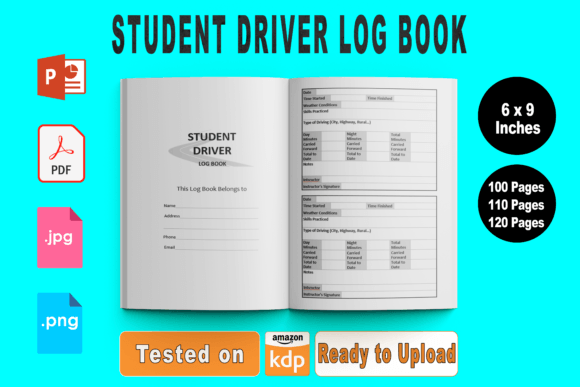
A KDP interior is the inside pages of a paperback or hardcover book. For a student driver log book, the interior typically includes pages for recording driving dates, practice duration, skills practiced, and instructor or parent signatures. The Student Driver Log Book – KDP Interior product gives you a ready-to-upload file package: PDF for direct publishing, PPTX for editing, transparent PNG files for cover or interior elements, and high-resolution JPG files as a bonus. The trim size is 6 x 9 inches, and bleed is set to none. Page options include 100, 110, or 120 pages.
This interior is tested on Amazon KDP, which saves you from common rejection errors. But tested does not mean you can skip your own review. Knowing what to check separates a smooth launch from a frustrating revision cycle.
Ignoring the Page Count Options
One of the first decisions you will face is selecting between 100, 110, or 120 pages. Each count changes the spine width, the printing cost, and the perceived value. Some publishers pick the largest number thinking more pages equals more value. That is not always true.
If your target buyer is a teen driver just starting out, 100 pages may cover an entire learner period without overwhelming them. A parent or instructor might prefer 120 pages for multiple students or extended practice logs. The mistake is picking a page count without thinking about who will use the book and how long they will need it.
Better approach: Consider your audience. For a basic log meant to last a few months, 100 pages is generous. For a comprehensive program that covers parallel parking, highway driving, and night practice, 120 pages allows more detailed entries. You can even create multiple editions with different page counts and see which sells best. The editable PPTX file makes that easy.
Overlooking the No-Bleed Requirement
This interior is designed for no bleed. That means your content stops before the edge of the page, leaving a white margin. A common error is uploading a no-bleed file but checking the "bleed" box during setup, or vice versa. This mismatch causes Amazon to flag the file as improperly formatted.
The no-bleed specification is not a limitation—it is a practical choice. Log books are functional. Users write in them with pens. They do not need full-bleed color backgrounds. Keeping the interior clean and margin-safe also reduces printing costs and avoids content being cut off during trimming.
Check before uploading: In your KDP dashboard, under "Paperback Interior," make sure you select "No Bleed" and that your PDF matches those margins. If you edit the PPTX file, do not add elements too close to the edge. A safe rule is to keep all text and lines at least 0.25 inches from the trim.
Skipping the KDP Testing Verification
The product description says "KDP Tested." That is a good sign, but it does not guarantee your specific file will pass. If you modify the PPTX, add new pages, or change fonts, you may introduce formatting issues that the original tested file did not have.
I have seen publishers assume that because the original interior passed KDP checks, their edited version will also pass. Then they get an email from Amazon saying the file has errors. This wastes time and delays launch.
Practical step: After making any edit, upload the PDF to KDP and use the previewer. Check every page. Look for misaligned table borders, missing signature lines, or shifted header text. The previewer is your best friend. Use it before you hit publish.
Underutilizing the Editable PPTX File
The package includes an editable PPTX file. Many people never open it. They just upload the PDF and move on. That is a missed opportunity. The PPTX lets you customize the interior for different niches, add your branding, or adjust the layout to match a specific state’s driving requirements.
For example, you might want to add a section for night-driving hours or a checklist for pre-drive safety checks. With the PowerPoint file, you can insert new rows, change headings, or add instructions. This turns a generic log book into something more targeted.
One caution: Keep the original PDF as a backup. If you accidentally break the formatting in PPTX, you still have a clean version to fall back on. Also, save your edits as a new PDF, then test again in KDP.
Forgetting the Bonus JPG and PNG Files
The package includes transparent background PNGs and high-resolution JPGs. These are not just decoration. You can use the PNG for cover design, social media mockups, or A+ content images. The high-res JPGs can serve as product previews or be uploaded to sites like Etsy if you also sell there.
A common mistake is ignoring these files entirely. They add real value if you take a few minutes to use them. A clean cover with a transparent logo element can make your book look more professional. The JPGs also help when you create promotional graphics for your audience.
Suggestion: Open the PNG files and see how they layer on a background. Use them to create a consistent look across your listing and any external promotions. Even one good image can improve click-through rates.
Misunderstanding the 6 x 9 Inch Trim Size
Six by nine is a standard trade paperback size. It works well for log books because it offers enough space for handwritten entries without being bulky. But some publishers think bigger is better and try to scale the interior to 8.5 x 11. Do not do that. Scaling changes margins, line spacing, and the overall proportions. You will likely end up with cut-off content or uneven borders.
Stick with 6 x 9. It is a proven size for journals and log books. It fits easily in a glove compartment or backpack. If you want a different size, look for an interior specifically designed for that dimension rather than trying to resize this one.
Neglecting the Print-on-Demand Cost Implications
Every page adds cost. With KDP’s printing formula, a 120-page book costs more to print than a 100-page book. That affects your royalty. If you price your book at $7.99, the difference between 100 and 120 pages might reduce your profit by $0.30 to $0.50 per sale. That adds up.
The mistake is choosing a page count based only on what looks good rather than what makes financial sense. Do the math. Check KDP’s current printing costs for 6 x 9 books at different page counts. Then decide which page count gives your buyers enough value while keeping your royalty healthy.
Example: If you want to price the book under $10, 100 pages may be the sweet spot. If you charge $12.99 or more, 120 pages can feel justified. Test different price points and page counts over time.
What to Check Before You Hit Publish
Before you upload, run through this short checklist:
- File format: Is your final file a print-ready PDF? The package gives you PDF, but if you edited the PPTX, export as PDF.
- Bleed setting: Have you selected "No Bleed" in KDP? Does your PDF have a white margin around all content?
- Page count: Does the number of pages match what you selected (100, 110, or 120)? Count them yourself.
- Preview check: Have you used the KDP online previewer to flip through every page?
- Bonus files: Have you considered using the PNG or JPG files for your cover or promotions?
- Editable copy: Do you have the PPTX saved in case you need to make future updates?
Making the Most of This Interior Product
The Student Driver Log Book – KDP Interior is a solid foundation. It saves you the time of designing a layout from scratch and gives you multiple file formats for flexibility. But it works best when you treat it as a starting point rather than a finished product. Add your own touches. Tailor it to a specific audience—maybe teen drivers, adult learners, or driving instructors who need to track multiple students. Adjust the page count to match your pricing strategy. Use the bonus files to strengthen your listing.
Avoid the common pitfalls: skipping the preview, ignoring the no-bleed requirement, picking a page count without purpose, and underestimating the value of the editable files. Each of these mistakes costs you time, money, or customer satisfaction. Fix them before you publish, and your log book will be ready for a smooth launch.
Remember, Amazon KDP rewards quality and relevance. A well-formatted interior that meets buyer expectations leads to better reviews, fewer returns, and steady sales. Take the extra few minutes to verify your file, and you will set yourself up for success in the low-content publishing space.