How the Tasks List Planner Template Works for You
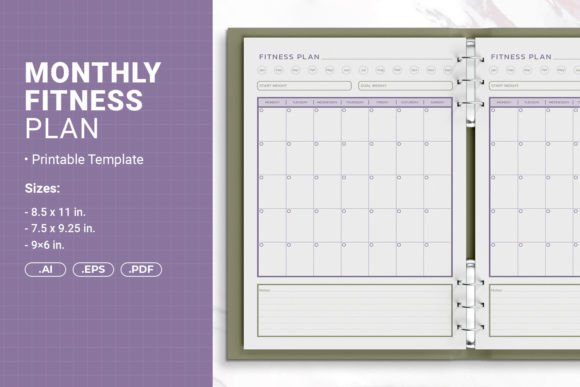
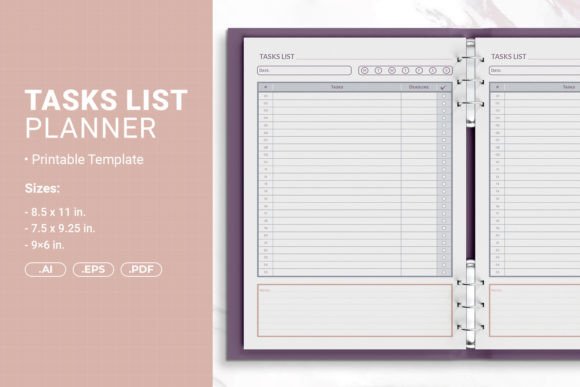
When you explore a tasks list planner printable template, you are looking at more than just a set of lines and checkboxes. You are looking at a foundation for a book, a binder insert, or a productivity tool that someone will use every day. The template in question comes with three sizes—8.5 x 11, 7.5 x 9.25, and 6 x 9 inches—and includes AI, EPS, and PDF files. It is ready for print or upload to Amazon KDP with bleed, and it includes safe margins for hole punching and binding. This article walks through what that means for different kinds of people, from the beginner publishing their first planner to the experienced creator looking for a reliable commercial asset.
What Makes This Template Different from a Basic List
A tasks list planner is often the first thing a new author or entrepreneur tries to create. The challenge is that most people underestimate how much technical detail goes into a file that prints well at scale. This template addresses the common pain points: correct bleed margins, trim lines, and safe zones for binding methods like rings, coils, or comb binding. For the person who has never uploaded a PDF to KDP, having a file that already includes bleed removes the guesswork. For the experienced binder maker, the hole-punch margin means you can print, punch, and insert without losing content near the edge.
The three sizes matter because different projects need different formats. A 6x9 inch book fits nicely on a nightstand or in a bag. An 8.5 x 11 inch version is ideal for a desk reference or teacher's binder. The 7.5 x 9.25 inch size splits the difference and works well for gift-style planners or professional portfolios. Each size uses the same layout, so you can create a series that looks consistent across formats.
Beginners and First-Time Self-Publishers
If you have never created a book file before, the hardest part is often the setup. You need to know what bleed is, how to set margins, and how to export a print-ready PDF. This template eliminates that learning curve. You open the AI or EPS file, customize the content, and export. The PDF file included is already print-ready, so you can test a single copy at home or upload directly to KDP. For someone who just wants to get a planner listed and start selling, that speed is the difference between launching this week and launching next month.
A beginner might also worry about mistakes. With the open-source Illustrator file, you can see exactly how the layers are built. If you want to change the font, the color, or the line spacing, you have full control. The EPS file provides a fallback if you use older software or want to work in a different vector editor. The PDF serves as the final output or as a proof you can check before committing to a print run.
Experienced Creators and Designers
If you already design planners or journals, you know that consistency across sizes saves time. Instead of building a new layout for every size, you have three sizes that share the same structure. You can adjust the scale or tweak the spacing, but the core work is done. The AI files are layered and organized, so you can modify colors, add icons, or change the header style without rebuilding the frame.
For someone who sells on multiple platforms—Amazon KDP, Etsy, Gumroad, or their own site—having the PDF with bleed means one file works for both print-on-demand and local printing. The EPS format also allows you to bring the design into Canva Pro, Affinity Designer, or CorelDRAW if you prefer those tools. Experienced users often evaluate templates on how much they can customize without breaking the layout. This template holds up because the margins and bleed are locked into the document setup, and the content areas are clearly defined.
Educators and Hobbyists
A teacher might use the 8.5 x 11 size to create a classroom tasks list that students can keep in a binder. The hole-punch margin ensures that no checkboxes or labels disappear after punching. A hobbyist who runs a small Etsy shop might use the 6x9 size to create a digital download that customers print at home. The PDF with bleed works for both professional printing and home printers, which matters when your customers have different equipment.
Educators also appreciate that the template is straightforward. There is no complex grid, no confusing symbols, just a clean layout that works for tracking assignments, reading goals, or project steps. If you want to add your own headings, you can type directly into the PDF or edit in Illustrator. The flexibility means you are not locked into one use case.
Ease of Use and Speed
For a busy entrepreneur or freelancer, time is the most important factor. They do not want to spend hours fixing margins or resizing elements. This template is ready to go. You can duplicate the page, add more lines, or change the size in a few clicks. The AI file keeps layers separate, so you can hide decorative elements if you want a minimal version. The EPS file is similarly structured. For someone who needs multiple variations for a product line, that efficiency is valuable.
Commercial Value and Long-Term Use
If you plan to sell planners on Amazon KDP, the template's compatibility with KDP's requirements is a major advantage. KDP rejects files that do not have proper bleed or that have content too close to the trim line. This template is built to those specifications. The three sizes cover the most common KDP formats, and the PDF works for both black-and-white and color interiors. Over time, you can reuse the same template for different themes—just change the cover and the content inside. That long-term reuse makes the cost of the template negligible compared to the time it saves on each project.
For a small business owner who uses planners as branded giveaways or client gifts, the template's professional look matters. A clean, consistent layout reflects well on your brand. You can print a small batch at a local shop or use a print-on-demand service. The hole-punch margin also means you can bind them yourself with comb or wire binding, which keeps production costs low.
Quality and Presentation
Quality in a printable template means that the lines align, the margins are consistent, and the file prints without unexpected cropping. This template delivers that because the AI and PDF files were set up with print standards in mind. The 300 DPI resolution is suitable for commercial printing. The text and line weights are visible but not overpowering. For someone who evaluates templates based on how the final product looks in a customer's hands, these details separate a professional product from a homemade one.
Bloggers and content creators who offer free or paid downloads to their audience also benefit. You can attach the PDF to an email opt-in or sell it as a digital product. Because the file is polished, your audience is more likely to print and use it, which builds trust and engagement.
Practical Examples for Real Projects
Imagine you are a freelancer who manages multiple client projects. You could print the 8.5 x 11 size and use a three-ring binder to track weekly tasks. The hole-punch margin means you can print both sides and still read everything after punching. If you decide to turn that system into a digital product, you can reuse the same template, add your branding, and sell it on Etsy.
Consider a small business owner who runs an online course. You could create a student tasks list that accompanies each module. Print them in the 7.5 x 9.25 size and include them in a welcome kit. The uniform size looks intentional and professional. If students want to print extra copies at home, the PDF works on any standard printer.
An educator might create a semester-long task tracker for a classroom. With the 8.5 x 11 binder size, students can keep it in their class binders. The simple layout works for all grade levels. You can even add your own due dates and instructions in the PDF before distributing.
A creator who sells digital products can use the template to build a series: a daily tasks list, a weekly overview, and a monthly goals page, all in the same style. The three sizes allow you to offer the same content in different formats, which gives customers a choice and increases the likelihood of a sale.
How to Know If This Template Matches Your Goals
If your goal is to create a finished product quickly, and you want to avoid technical setup, this template is a strong match. The included PDF with bleed means you can upload to KDP or send to a printer today. If you value flexibility and want to customize colors, fonts, or layout details, the AI and EPS files give you full control. If you need multiple sizes for a product line, having three sizes in one package saves you from buying separate templates.
Beginners will appreciate the low learning curve. Experienced designers will appreciate the clean file structure. Educators and small business owners will appreciate the practical hole-punch margin and the professional print quality. There is no one-size-fits-all in planner design, but this template comes close by giving you the options to fit your size, your format, and your workflow.
Whether you are publishing your first journal on Amazon, creating a binder system for your team, or offering a digital download to your audience, the tasks list planner printable template provides a reliable foundation. You can start with the PDF for immediate use and move to the AI files when you are ready to add your personal touch. The result is a product that looks intentional, prints correctly, and works for real people in real situations.